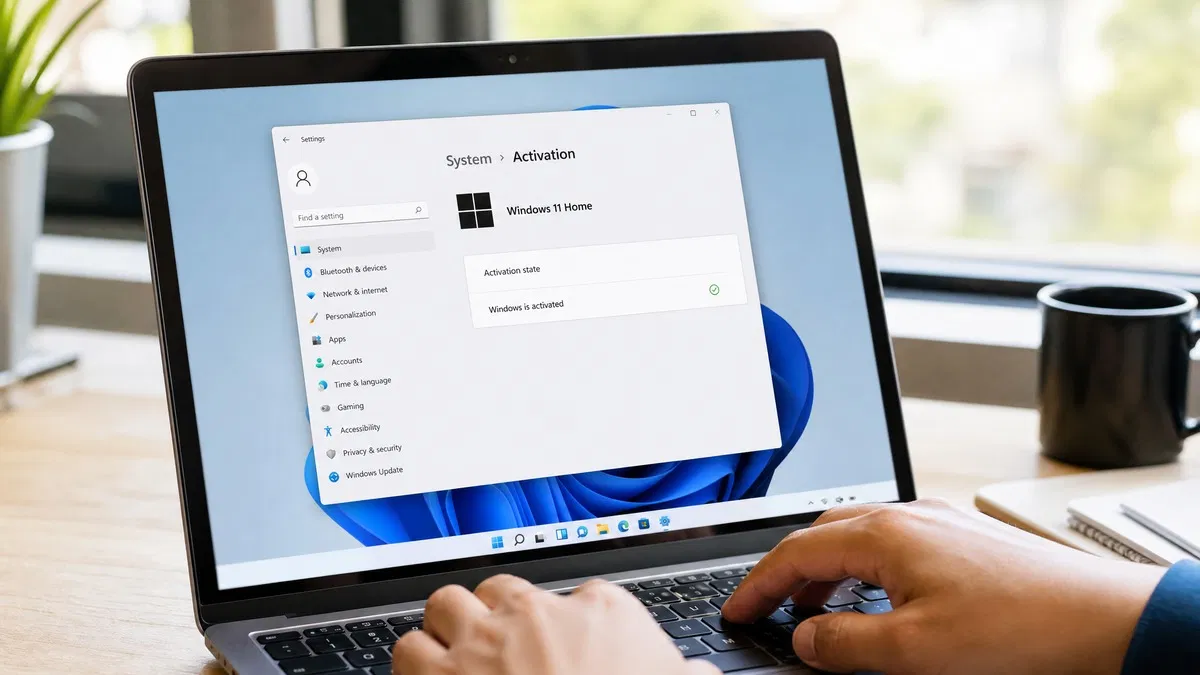
Here is how to activate Windows 11: open Settings, go to System, then Activation, click Change product key, enter your 25 character key and click Next, then Activate. Within a few seconds the page should read “Windows is activated with a digital license”. If the PC is offline or online activation fails, the slui 4 command opens phone activation, and the error code on screen tells you exactly what went wrong.
How to activate Windows 11 with a product key
Windows 11 activation takes under two minutes when the key matches the edition installed. Have the key ready, confirm the PC is connected to the internet, and follow these steps.
- Click Start, open Settings, then System, and scroll down to Activation.
- If the page says “Windows is not activated”, expand Change product key and click Change. A User Account Control prompt may appear; click Yes.
- Type the 25 character key. Dashes are added for you. Click Next.
- Click Activate. Windows contacts Microsoft’s activation servers and, on success, shows “Windows is activated”.
- Go back to the Activation page. The state should read Active, with “Windows is activated with a digital license” beneath it.
Both Windows 11 Pro and Windows 11 Home keys from OfficeGSM activate this way; the version with screenshots lives in our Windows 11 Pro download and activation guide.
How to check Windows 11 activation status
You can check Windows 11 activation status two ways. The Settings page is the quick one. The command line gives more detail about the license type.
- Settings: open Settings, System, Activation. Read the line under Activation state.
- Command Prompt: open Command Prompt as administrator and run
slmgr /xpr. A dialog reports whether the machine is permanently activated. Runslmgr /dlito see the license channel (Retail, OEM_DM or Volume) and the last five characters of the installed key.
| What the Activation page says | What it means |
|---|---|
| Windows is activated with a digital license | Activated. The license is tied to this PC’s hardware and stored on Microsoft’s servers. |
| Windows is activated with a digital license linked to your Microsoft account | Activated, and you can reactivate after a hardware change by signing in with that account. |
| Windows is activated using your organization’s activation service | Volume license activated through a KMS server. Common on work PCs; it expires if the PC leaves the network for 180 days. |
| Windows is not activated | No valid license. Personalization settings are locked and a watermark appears. See the error code beneath for the reason. |
| Windows reported that no product key was found on your device (0xC004F213) | The install never had a key or the firmware key could not be read. Enter your key. |
How to activate Windows 11 Pro specifically
To activate Windows 11 Pro, the edition installed must be Pro. Open Settings, System, About and read the Edition line. If it says Windows 11 Home and you hold a Pro key, do not try to activate Home with it; instead use the same Change product key button, which upgrades the edition to Pro and activates it in one pass. Windows downloads a few components, restarts, and comes back as Pro with the Activation page reading Active.
If the About page already says Pro, activation is exactly the same as for Home. One extra detail: Pro allows a local account during setup, so a Pro PC may have no Microsoft account attached. We suggest adding one under Settings, Accounts after activation so the digital license is linked to it, which makes a future motherboard swap far simpler.
How to activate Windows 11 by phone using slui 4
Phone activation exists for PCs that are offline or for cases where the online servers refuse a valid key.
- Press Windows key + R, type
slui 4and press Enter. - Pick your country or region and click Next. The screen shows a toll free number and a 63 digit installation ID broken into groups.
- Call the number, or use Microsoft’s automated line, and read out each group when prompted. If you bought your key from OfficeGSM and would rather not sit on the phone, our Microsoft confirmation ID service returns the confirmation ID for your installation ID.
- Click Enter confirmation ID and type the 48 digits into the eight boxes.
- Click Activate Windows. The Activation page should now read Active.
If slui 4 does nothing, the PC is usually in a state where phone activation is not offered, such as when no key has been entered yet. Enter the key first with slmgr /ipk XXXXX-XXXXX-XXXXX-XXXXX-XXXXX from an administrator Command Prompt, then run slui 4 again.
Windows 11 activation errors and what to do about each one
The Activation page prints an error code whenever a key is rejected. These are the ones we see most often at our support desk.
| Error code | Cause | Fix |
|---|---|---|
| 0xC004F050 | The key is invalid for this edition, most often a Home key on a Pro install or the reverse | Check the Edition line under System, About; install or upgrade to the matching edition, then enter the key again |
| 0xC004C003 | The key has been blocked or is in use on another device | Remove it from the old PC with slmgr /upk, then retry; contact the seller if it was never used |
| 0xC004C008 | The key has reached its activation limit | Use phone activation through slui 4, which can clear a stale activation record |
| 0xC004F213 | No product key found on the device | Enter your key under Change product key |
| 0x803F7001 | Windows could not find a valid license after a hardware change or clean install | Run the activation troubleshooter and choose “I changed hardware on this device recently” |
| 0xC004F074 | No Key Management Service could be contacted | Volume license on a PC away from the company network; connect to the VPN or use a retail key instead |
Microsoft documents the full list on its Windows activation errors page, and the general steps on its Activate Windows support page.
Digital license or product key: which one do you have?
Every Windows 11 activation ends up as a digital license, so the distinction only matters at the start. A PC upgraded from Windows 10, or one that shipped with Windows preinstalled, already has one and activates on its own once online. A new build or a Home to Pro move needs a product key entered once. After that, the license follows the hardware.
Our take: enter the key once, confirm the page says “Windows is activated with a digital license”, then sign in with a Microsoft account so the license is linked to it. Keep the key in your email or password manager anyway. If you are still waiting on a key, a genuine retail Windows 11 Pro license costs $10.99 at OfficeGSM and activates through exactly the steps above. Skipping activation is not a workaround; we explain the limits in our post on what happens if you don’t activate Windows.
Every Windows edition we sell is listed on the Windows category page.
Frequently asked questions
How do I check if Windows 11 is activated?
Open Settings, then System, then Activation. The Activation state line says Active with a green check when everything is fine, and below it you will see either “Windows is activated with a digital license” or “Windows is activated with a digital license linked to your Microsoft account”. For a command line check, open Command Prompt and run slmgr /xpr. A small window reports “The machine is permanently activated” for a retail or OEM license, or shows an expiry date for a volume license.
Can I activate Windows 11 without a product key?
Only if the PC already has a digital license. That happens when the machine was upgraded from an activated Windows 10, when the manufacturer embedded a key in the firmware, or when you activated once before and linked the license to your Microsoft account. In all those cases Windows activates on its own once it is online. If none apply, you need a key. Tools and scripts that promise free activation are piracy, are often malware, and leave you with an install Microsoft can deactivate at any time.
Why does my Windows 11 key say it is invalid?
The most common reason is an edition mismatch: a Home key entered on a Pro install, or a Pro key on Home, returns error 0xC004F050. Check the Edition line under Settings, System, About. The second most common reason is a typo, since 25 character keys mix B and 8 or O and 0 easily. Third, the key may already be in use on another PC, which shows as 0xC004C003 or 0xC004C008. Retail keys move, but only after being removed from the old PC.
What is slui 4 and when should I use it?
slui 4 is a command that opens the phone activation wizard directly. Press Windows key plus R, type slui 4 and press Enter, choose your country, and Windows shows a 63 digit installation ID. You read that ID to Microsoft by phone or through an automated line, and receive a 48 digit confirmation ID to type back in. Use it when online activation fails with a server error, when the PC has no internet, or when a support agent asks you to.
Does activation survive a reinstall of Windows 11?
Yes, as long as the hardware is the same. Activation creates a digital license tied to a fingerprint of your motherboard and stored on Microsoft servers. After a clean install on the same PC, skip the key prompt by clicking “I don’t have a product key”, pick the same edition, and Windows activates when it connects to the internet. If you replaced the motherboard, sign in with the Microsoft account you linked the license to and run the activation troubleshooter.
Need a key to finish activation?
Genuine retail Windows 11 Pro keys, emailed within minutes, with phone activation support from our team if the online servers give you trouble.